



Your event date is locked in, the welcome packs are taking shape, and someone suggests branded USB drives. They look useful, they're easy to personalise, and the cheapest quote leaves room in the budget for better packaging. Then IT asks what's on them, procurement asks what the quote excludes, and nobody knows what recipients will do with them afterwards.
That's the buying decision. A branded USB drive is both a giveaway and a device, so its value depends on more than the logo. For Australian organisations, the strongest choice is a drive that recipients can use, your IT team can approve, and your business can retire responsibly.
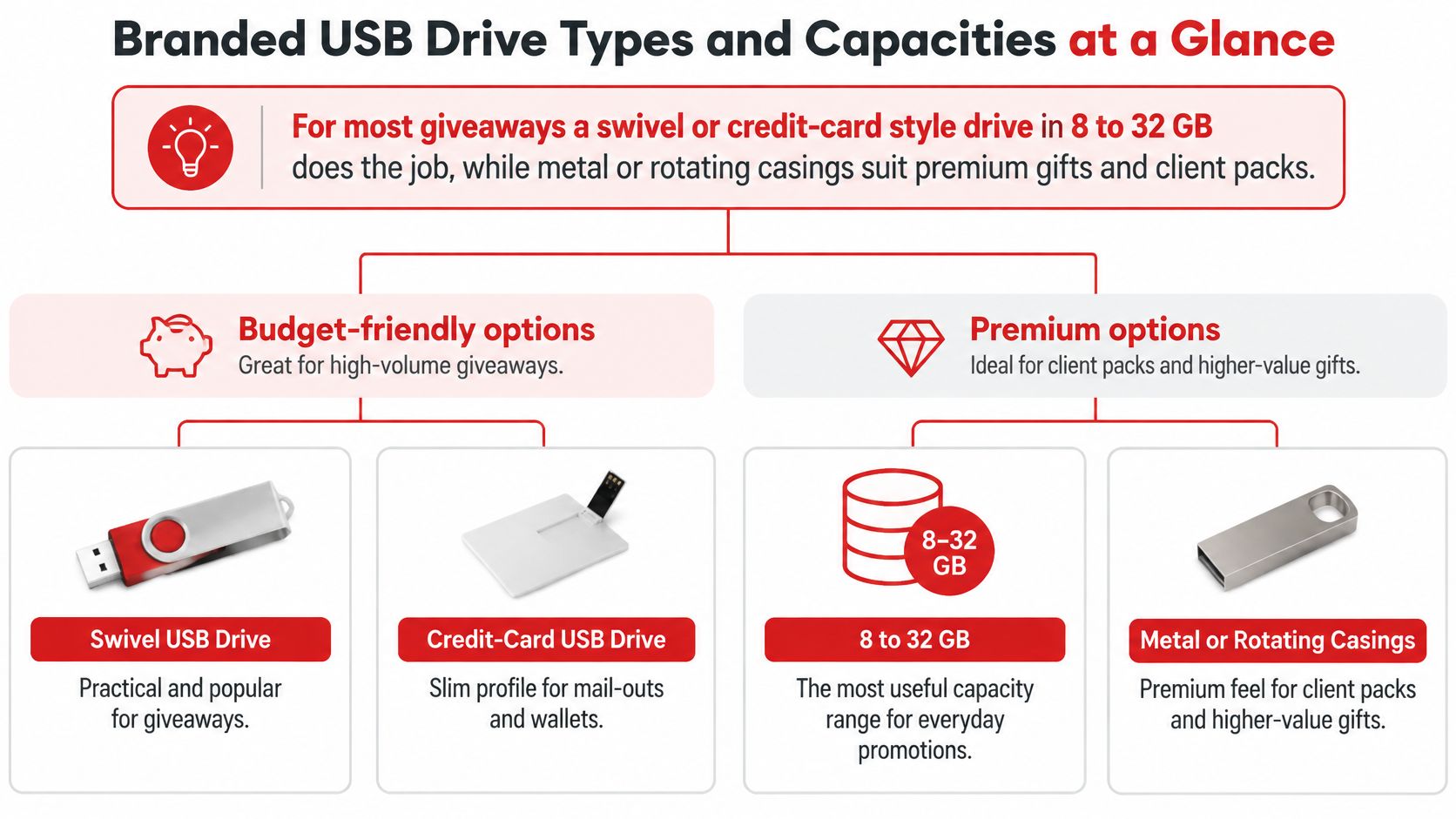
Branded USB Drive Types and Capacities at a Glance
For most giveaways, choose a swivel or credit-card style drive with capacity matched to the approved files. Metal bodies suit client gifts where the finish matters. Dual USB-A and USB-C models make sense when recipients carry different devices, though connector compatibility never overrides a workplace ban on removable media.
Match the style with this visual guide before requesting samples.
Choose the shape around the recipient
The casing works like business-card stock: weight, texture and finish say something before anyone opens a file. A practical plastic swivel earns its place on a busy exhibition stand, while an engraved metal body sits more naturally beside a carefully prepared client proposal.
The table below is a buying shortlist, not a supplier specification. These ranges reflect what each form factor commonly ships in, so use them to shortlist, then confirm which capacities your chosen model supports before artwork is approved.
Branded USB drive form factors, capacity and best uses
| Form factor | Typical capacity | Best use | Relative cost |
|---|---|---|---|
| Classic swivel plastic | 8 GB to 128 GB | Trade show giveaways and bulk events | Low |
| Credit-card style | 8 GB to 128 GB | Conference handouts and wallet-friendly gifts | Low |
| Keyring or lanyard mount | 4 GB to 64 GB | Everyday carry and staff gifting | Low to medium |
| Slim metal bar | 8 GB to 128 GB | Executive gifts and premium client packs | Medium |
| Rotating or twist metal | 8 GB to 128 GB | Mid-range corporate gifts | Medium |
| Bamboo or wood casing | 4 GB to 64 GB | Eco-positioned campaigns | Medium |
| Dual USB-A and USB-C | 16 GB to 256 GB | Device-mixed onboarding kits | Medium to high |
Buy useful storage, not spare capacity
Assemble the actual files before choosing capacity. A folder of brochures, PDFs and presentation slides needs far less room than video, installation packages or an offline training library, so let the bundle set the size.
Leave sensible room for the recipient's own files, because reuse is where the drive earns its keep. A drive someone reaches for weekly keeps your logo in front of them long after the event ends. Keep the trade-off in view, though: this is still a managed device, and every spare gigabyte is more storage IT may need to account for when the drive is eventually retired. Skip the larger model if it only sounds more generous.
Demand hasn't disappeared. According to IndexBox's Australian USB flash-drive market analysis, Australian unit volume is estimated to have grown at a compound annual rate of 3–5% from 2019 to 2025, which gives buyers every reason to compare carefully rather than assume any available drive will do.
Compare branded technology products alongside your shortlist so the USB competes fairly against other useful gifts.
Buying test: What will the recipient actually do with this drive, and do its shape and storage support that task?
Tech Specs That Change the Real Value of a Drive
Identical logos can hide very different electronics. A drive can look polished yet make recipients wait while files copy, fail to fit beside another plugged-in device, or arrive without any meaningful performance specification.
Specify the technology before approving the casing. The USB standard describes the interface, while the flash memory and controller affect the performance you experience. A supplier's interface label isn't a substitute for testing a production-representative sample.
USB standards and what they mean for branded drives
| Standard | Theoretical speed | Best for |
|---|---|---|
| USB 3.2 Gen 1 | Ask the supplier to state the interface ceiling separately from tested transfer performance | Sensible all-round default for most campaigns |
| USB-C connector | Set by the protocol behind the connector, not its shape | Mixed phones, tablets and laptops |
Test the work, not just the label
Document-only handouts don't demand the same transfer performance as media-heavy packs. If your campaign includes video or a large catalogue, copy the complete folder onto the sample and open it on the kinds of computers recipients will use.
Check both writing and reading. Your fulfilment team writes the files during preparation; recipients read them afterwards. A model that performs acceptably for the recipient can still create a frustrating loading job for your team.
Ask the supplier to identify the flash memory specification and provide any supported retention, endurance and warranty information. Avoid accepting an unexplained quality label as evidence. You need a product specification, a testable sample and a clear remedy if the delivered batch doesn't match.
Advertised capacity also isn't the same as the free space displayed after formatting. Confirm usable capacity on the sample, especially when the approved content nearly fills it.
Put the essentials in the brief
- Interface and connector: Name the USB standard and whether the drive needs USB-A, USB-C or both.
- Usable storage: Require enough formatted space for the approved folder and the intended recipient task.
- Performance evidence: Request sample results using your actual file set, rather than an isolated headline speed.
- Protection features: Ask about physical write protection and hardware encryption where the use case requires them.
- Acceptance criteria: State that the delivered product must match the approved sample and specification.
Don't force a USB into a campaign that doesn't need file storage. If delegates mainly need help keeping phones charged, Dirt Cheap Product, Inc.’s guide can help you choose promotional portable chargers instead. The useful gift is the one that solves the audience's problem.
Branding Methods and When Each One Wins
Match the branding method to the artwork and casing, not the other way round. A photographic campaign graphic and a restrained corporate wordmark need different treatments. Trying to reproduce either with the wrong process usually creates compromises you could have avoided at the quotation stage.
A bold logo may look excellent in a simple print. Fine lettering can suit engraving on an appropriate metal finish. A subtle tactile mark can feel more considered than filling every available surface with colour.
Branding methods compared for branded USB drives
| Method | Best for | Colour range | Durability |
|---|---|---|---|
| Screen or pad printing | Bold logos with few colours | Limited, separate ink applications | Good when inks are properly cured |
| Full-colour digital printing | Photographic and gradient artwork | Full colour | Surface can wear with handling |
| Laser engraving | Metal bodies and fine text | Single tone, no ink | Very durable |
| Debossing or embossing | Premium, subtle branding on suitable materials | Tone-on-tone | Very durable |
| Moulded logo | Large plastic runs with simple artwork | Set by the moulded resin | Built into the casing |
Choose what needs to survive
For a drive carried on keys, assess the branding as a handled object, not a pristine photograph. Printed surfaces can rub against coins, keys and bag hardware. Ask whether the proposed process needs a protective finish and inspect how it behaves on the actual casing.
Laser engraving removes the problem of ink wearing away, but it doesn't reproduce your corporate colours. The underlying material determines the appearance, so ask for an engraved sample rather than approving from a digital simulation.
Debossing and embossing also need suitable surfaces. They aren't interchangeable options for every USB body. A supplier should confirm whether the casing can take the process without compromising fit or function.
Compare the available custom printing options before finalising artwork. Ask which processes are available for your shortlisted drive, which require external production, and whether that changes approval or delivery arrangements.
Make the small surface work harder
USB artwork needs simplification. A logo that reads beautifully on a tote bag can become an indistinct patch on a narrow swivel arm.
- Protect the edges: Keep important artwork inside the supplier's safe print area and away from seams, pivots and connector covers.
- Simplify fine details: Remove tiny supporting text and decorative lines that won't reproduce clearly at final size.
- Check contrast: Judge the mark against the actual casing colour, especially on dark, brushed or textured finishes.
- Approve physical colour: Use a sample when colour matching matters, rather than trusting your monitor.
- Preserve functionality: Make sure printing, moulding or packaging doesn't obstruct the connector or moving parts.
For a controlled staff programme, reserve space for an asset identifier or help-desk reference. Keep it visually distinct from the campaign message so the drive can work as a branded object without becoming difficult to administer.
A clear logo on a well-finished surface looks more confident than a crowded miniature advertisement.
Metal, Plastic and Eco Casings Compared
Metal earns its place when the recipient will notice and value the finish. Plastic earns its place when you need a practical, lightweight giveaway without spending the budget on presentation alone. Neither material tells you whether the storage inside is reliable.
Choose the casing for the use, then examine the environmental claim separately. Bamboo, wood and recycled plastic can support a thoughtful product choice, but a natural-looking shell doesn't make the electronic components biodegradable.
Compare the trade-offs honestly
Metal can offer a reassuring feel and good resistance to everyday knocks, although the exact construction matters. It can also add weight and narrow your branding options. Inspect edges, connector alignment and moving components rather than judging quality by weight alone.
Plastic gives buyers more freedom with colour and moulded shapes. It's a sensible option for broad distribution, provided the casing closes properly and doesn't flex alarmingly during normal handling.
For sustainability-led campaigns, ask what part of the product contains the claimed material. Request evidence for recycled content or material certification where those claims will appear in your campaign. Packaging deserves the same scrutiny.
Australia generated approximately 511,000 tonnes of e-waste in 2019, according to the Australian Government's e-waste guidance. The same guidance describes national recycling arrangements, but access to a scheme doesn't automatically mean your particular USB drive will be accepted.
Make the end-of-life plan part of selection
- Choose metal for a keepsake: Spend on the finish when long-term handling and presentation genuinely matter.
- Choose plastic for practical distribution: Prioritise sound construction and avoid unnecessary novelty components.
- Choose eco-positioned materials with evidence: Support the material claim with a credible reuse or collection arrangement.
- Check the recycler before ordering: Confirm acceptance of the complete device and any requirements for its preparation.
Compare eco promotional products by their usefulness and disposal pathway, not just their appearance. If a secure download achieves the same purpose and recipients don't need physical storage, skipping the electronic giveaway may be the more defensible choice.
What Drives Price and Minimum Order Quantities
The unit price is only one line in the budget. A cheap drive can become an expensive order once artwork changes, packaging, content loading, freight and internal handling are included.
Minimum order quantities usually reflect the supplier's production arrangements and fixed setup work. A smaller order doesn't make those tasks disappear. Equally, a larger order isn't automatically better value if your team ends up storing obsolete campaign stock.
Identify what you're paying for
- Capacity tier: Ask for the price difference between suitable storage options, rather than automatically selecting the largest.
- USB specification: Compare like-for-like interfaces, connectors and tested performance.
- Casing construction: Material, moving parts and custom shapes can change production costs.
- Branding process: Separate artwork preparation, colour applications, tooling and repeat-order charges.
- Presentation: Include boxes, sleeves, inserts and individual packing in the comparison.
- Content preparation: Identify who loads the files, checks the result and handles rejected devices.
- Delivery arrangements: Confirm freight, delivery location, split consignments and any storage charges.
The useful quantity bands are the ones shown on a written quote. Ask suppliers to price your confirmed requirement alongside a realistic alternative, rather than relying on universal discount thresholds.
Quantity bands and what changes in the price
| Quantity band | What changes | Buyer action |
|---|---|---|
| Small run below the supplier's normal production threshold | Fixed setup work is spread across fewer items | Order a sample and check the quote carefully |
| Standard production run | Stock availability and straightforward branding may improve efficiency | Compare equivalent specifications and inclusions |
| Custom or high-volume run | Tooling, dedicated production and stockholding become more relevant | Negotiate acceptance terms and staged delivery |
Compare the total delivered cost
Ask the supplier to show setup, artwork, samples, unit cost, packaging, loading, freight and GST treatment clearly. If an offer advertises free setup, get written confirmation that it applies to your exact product, artwork and branding method.
Use the bulk order enquiry process to request comparable options with the same specification. A quote is much easier to evaluate when every supplier is answering the same brief.
Budget discipline: A bulk discount only saves money when you actually use the additional stock.
Keep an allowance for internal work, too. IT review, content preparation, testing and handling returned devices don't disappear because the merchandise invoice looks inexpensive. Assign those tasks before approving the order so nobody has to absorb them during event week.
Data Security and Compliance Before Distribution
A reused, transferred or discarded drive can carry information nobody intended to share. In a 2016 Edith Cowan University study, researchers found that the majority of second-hand USB flash-memory devices purchased through eBay Australia contained substantial recoverable data, including sensitive and confidential material.
That finding doesn't mean branded drives are unsuitable. It means deleting files isn't a complete security process, and a logo doesn't turn an unmanaged device into a safe one.
Give IT a defined approval job
The Australian Cyber Security Centre's media guidelines recommend documented removable-media controls covering permitted use, registration, labelling, loss reporting and sanitisation. Turn that into an operating plan appropriate to the campaign, rather than treating every public giveaway like a staff asset.
- Approve the use: Confirm that intended recipients are allowed to connect removable storage to their systems.
- Control incoming media: Receive drives empty where practical, then have IT sanitise and prepare them through an approved process.
- Approve the content: Exclude personal information, internal drafts, hidden working files and unnecessary executables.
- Verify the file set: Generate a hash manifest for the approved folder, check loaded files against it and scan the media before release.
- Record distribution: Track batches and content versions. For assigned organisational devices, connect asset identifiers to authorised recipients.
- Prepare for incidents: Give staff a clear route for reporting a lost, returned or suspicious device.
For an open conference giveaway, don't collect personal information merely to create a recipient register. Record the batch, distribution point and content version unless there's a justified need for more detail.
Separate marketing handouts from sensitive storage
A public brochure pack and a drive carrying operational information need different controls. For sensitive information, obtain IT approval for hardware encryption, access management and recovery arrangements before placing an order.
The ACSC's secure-your-devices guidance also supports treating removable media as a potential malware entry point. Read-only or write-once arrangements can support particular transfer workflows, but they don't remove the need to verify the content and device.
End-of-life handling needs an approved sanitisation method suitable for the flash media. Ordinary formatting isn't proof that recovery is impossible, and you shouldn't promise that a generic wiping tool will reach every storage area. Have IT verify the result and arrange controlled destruction when successful sanitisation can't be established.
Beyond Surplus's explanation of how to permanently remove stored data is a useful introduction for procurement staff discussing the process with IT. The organisation's own security requirements should determine the method.
Artwork, Lead Times and Nationwide Delivery
A delivery deadline isn't a production plan. Buyers get into trouble when they treat artwork approval, sampling and freight as tasks that will somehow fit around manufacturing.
Work backwards from when the packed drives must be in your hands. That may be earlier than the event date if another team needs to assemble welcome kits or forward cartons to a venue.
The ordering sequence should be visible to everyone approving the job.
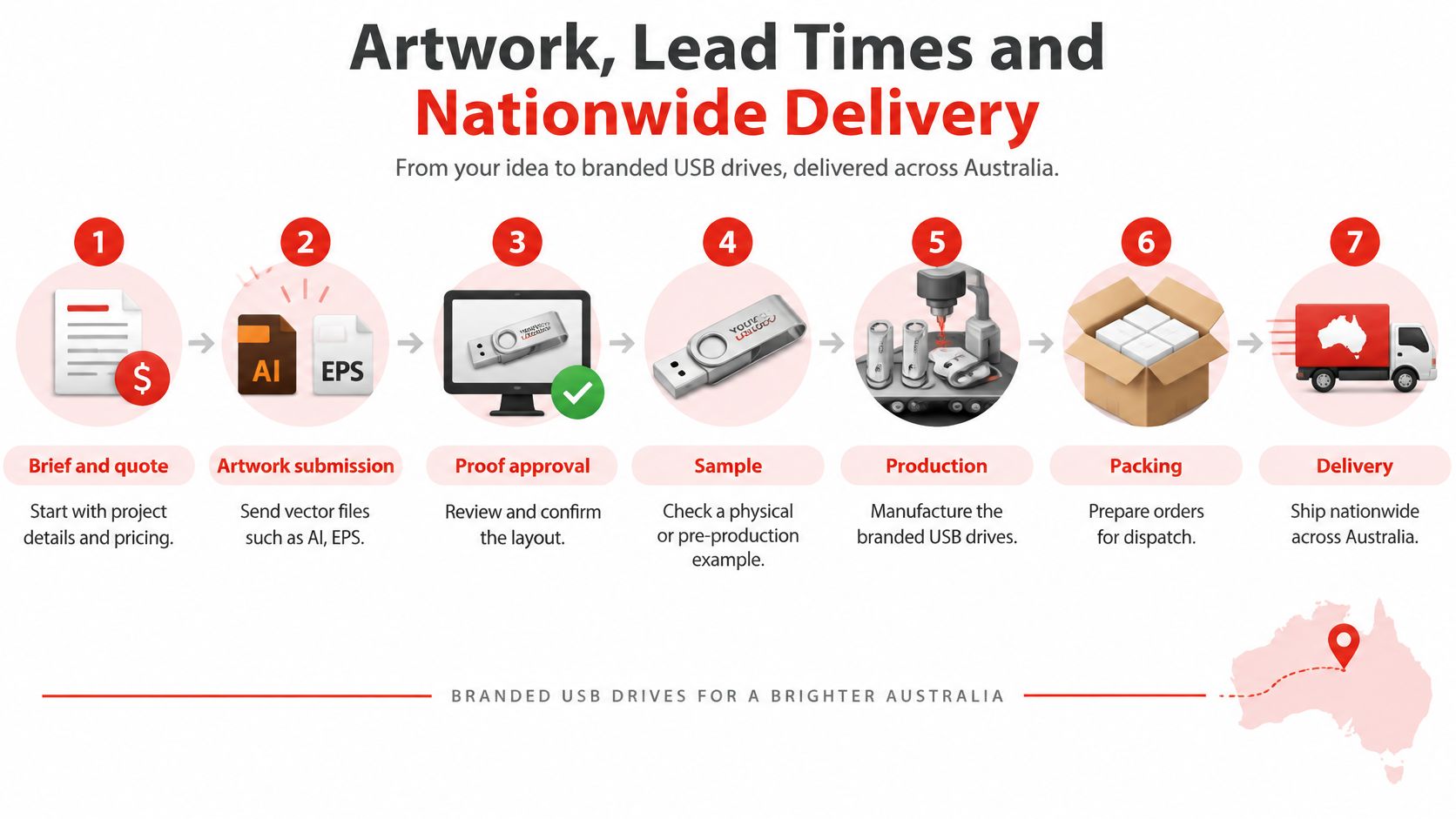
Agree on the approval sequence
- Brief and quote. Supply the intended use, specification, quantity requirement, delivery address and required arrival date.
- Artwork submission. Send production-ready files and identify the current approved logo version.
- Proof approval. Check placement, spelling, orientation, branding dimensions and the selected product.
- Sample review. Inspect the physical finish and test the device before authorising the main run.
- Production. Confirm that both artwork and content approval are complete before work starts.
- Packing. Agree on inserts, labels, carton identification and how different content versions will be separated.
- Delivery. Obtain dispatch details and make sure someone can receive and inspect the order.
Send artwork the printer can use
Provide a vector AI, EPS or vector PDF file with fonts outlined. A PDF isn't automatically vector, so ask your designer to check its contents before sending it.
For print, discuss CMYK artwork and Pantone references where colour matching is required. For engraving, supply clear vector shapes and ask how the chosen surface affects the result. Let the production team specify the minimum line weight and raster resolution for the actual process.
The artwork submission guide can help you prepare files before requesting a proof. Confirm in writing whether artwork layouts and revisions are included, and whether extra preparation or a changed brief attracts a charge.
A sample is particularly valuable when you're comparing casing finishes or branding methods. Check colour, engraving appearance, connector fit, cap security and packaging together, rather than approving each from unrelated photographs.
Plan freight as part of the job
Request separate dates for proof approval, production completion, dispatch and expected arrival. There's no useful universal lead time when stock availability, customisation and freight arrangements differ.
For deliveries across Sydney, Melbourne, Brisbane, Adelaide, Perth, Darwin and Tasmania, provide the complete destination and any receiving restrictions. Regional and remote locations need specific freight confirmation, not an assumption based on a metropolitan delivery estimate.
If the deadline is urgent, ask what an express service accelerates. Confirm stock, branding eligibility and freight arrangements before paying for urgency, and leave an explicit contingency for proof changes or transport disruption.
Gifting Examples and Your Next Step
A strong USB gift has a clear purpose. The recipient should understand why you've included it without needing a long explanation from your sales team.
Make the contents feel intentional
- Conference welcome drive: Include an approved welcome guide and a clearly named programme file, with a QR code on the insert for updates. Put the event identity on the drive and keep the folder easy to access.
- Metal client drive: Present the approved proposal in an engraved casing with a handwritten note. If the proposal is confidential, have the account owner and IT team agree on the delivery method before loading it.
- Staff onboarding kit: Supply an approved policy library on a controlled device, labelled for the help desk and prepared for the organisation's permitted workflow.
For creator campaigns, Sup's approach to influencer gifting offers a useful audience-first perspective. Apply that thinking to USBs: send a physical drive because it improves the recipient's experience, not because there's space for another item in the box.
Turn the shortlist into an order
- Define the task. Choose a form factor and storage specification around what the recipient needs to do.
- Set the acceptance criteria. Document compatibility, performance, protection features and sample testing.
- Resolve presentation and cost. Agree on casing, branding, packaging and the complete delivered price.
- Assign ownership. Name the people responsible for content approval, distribution and retirement.
- Lock the schedule. Obtain the proof, sample decision, production commitment and delivery arrangements in writing.
When comparing branded USB drives in Australia, choose the option your team can confidently prepare and support. A small, well-considered drive leaves a better impression than a lavishly packaged device that nobody can use.
Merchandise offers custom branded USB drives, artwork guidance and sampling options for Australian campaigns. Visit Simply Merchandise with your intended use, delivery deadline and preferred casing, then request a sample and an itemised quote with branding, freight and approval terms confirmed in writing.

