



Two hundred branded drives sit in a carton in the storeroom. The trade show is five weeks out, the artwork is approved, and the only item left on the run sheet is a deceptively small question: what goes on them?
That question decides whether a USB flash drive promo project works. Capacity and print method influence whether the drive gets kept. The decision about what gets loaded, and what the recipient is told to do with it afterwards, decides whether your brand ends up on a useful object or on a lost device holding somebody's private files.
Here's how I'd plan one: pick the smallest capacity that holds the public material, match the body to where the drive will live, print a mark that survives a pocket, and write down what happens to the drive after the event.
Capacity Options and What Each Size Suits
Say a trade show team has 200 drives to hand out in six weeks, plus a catalogue, a price list and a 40-slide deck. Someone suggests 64GB because it sounds generous. The drives cost more, the preload takes longer, and every unit leaves the stand carrying a file set that would have fitted on a drive a quarter of the size.
Capacity is the easiest spec to overspend on, and the easiest to get wrong in the other direction. Start with the bands below, then work backwards from the actual files.
| Capacity | Typical preload | Promotional fit |
|---|---|---|
| 8GB | One or two PDFs or a single brochure set | Fills quickly; suits simple handouts only |
| 16GB | Catalogue, slide deck and event schedule | Practical minimum for most promotions |
| 32GB | Multi-file kits and offline presentations | Good balance of room and data at risk |
| 64GB | Image-heavy media kits or a short video | Suits media kits; more data at risk if lost |
| 128GB | Large media libraries | Rarely needed for promotion; highest consequence if lost |
Read the middle rows and you'll land on 16GB for most campaigns. It holds a catalogue, a deck and an event schedule without forcing you to cut pages. An 8GB drive is fine for a single brochure set and nothing more. A 32GB drive earns its place when you're shipping multi-file kits or an offline presentation that has to run without a connection.
Above 32GB the arithmetic changes. A 64GB drive suits an image-heavy media kit or a short video loop, but the volume of content on the device is now the thing you worry about when it's lost. At 128GB you're handing out a small archive, and almost no promotion needs one. The rule is the smallest capacity that holds your public material, never the biggest number on the packaging. Fewer gigabytes is a security and support decision as much as a cost one.
A five-minute sizing check
List every file you plan to load. Add up the sizes. Add roughly 20 per cent headroom for the file system and one late addition, then choose the row your total lands in, and if that total pushes you toward 64GB, ask whether the material should be a link instead. The technology branded products range shows how the capacity bands map onto the body styles most campaigns use.
Matching Drive Design to Each Campaign
A drive pressed into a hand at a trade show and a drive posted to a new starter face very different lives ahead of them. Let the campaign set the body, the capacity and the content rules, in that order.
| Campaign | Recommended design and capacity | Preload and data rule | Branding focus |
|---|---|---|---|
| Trade show lead capture | Solid plastic or metal body, 16GB | Public brochures only; QR code for follow-up | Full-colour logo on the body |
| Corporate onboarding | Soft-grip or slim body, 32GB | Non-sensitive welcome material; never HR or payroll records | Single-colour logo and name |
| School open day | Hard-wearing plastic body, 16GB | Course information and campus maps | Bright colourway and large logo |
| Community or nonprofit program | Reusable design, 16GB to 32GB | Public resources only; no personal data | Short message and web address |
| Government-facing event | Encrypted media, or no USB at all | Public documents only; check agency policy first | Minimal branding |
Read the data rule column before the design column. It carries the consequences. A blank 16GB drive in a branded sleeve is a low-risk giveaway; the same drive preloaded with a customer export is a privacy incident waiting for a train seat. Design choice is a governance choice too, because a drive people keep and reuse keeps circulating whatever you loaded onto it, so the body you pick partly decides how long your data stays in the wild.
Government-facing work deserves its own line in your planning. When an agency's policy is unclear, hand out a card with a QR code, or nothing at all. A branded notebook has never broken anyone's IT policy.
Design families compared
Pen-style bodies suit writing-led campaigns because the drive disappears into an object people already carry. The USB Pen 16GB Soft grip puts a 16GB drive in pen format, which is the body to look at when you want the drive sitting in a conference folder rather than a drawer. Slim bodies slide into a wallet pocket and suit mailouts where postage weight matters. Card-style drives post flat and print like a business card, though recipients tend to treat them as single-use. Metal bodies feel substantial in the hand and photograph well. They add weight and cost to a large run, and because people keep them, they give your branding the longest working life of the group.
Here's the format that suits a writing-led campaign, with the drive built into the barrel.
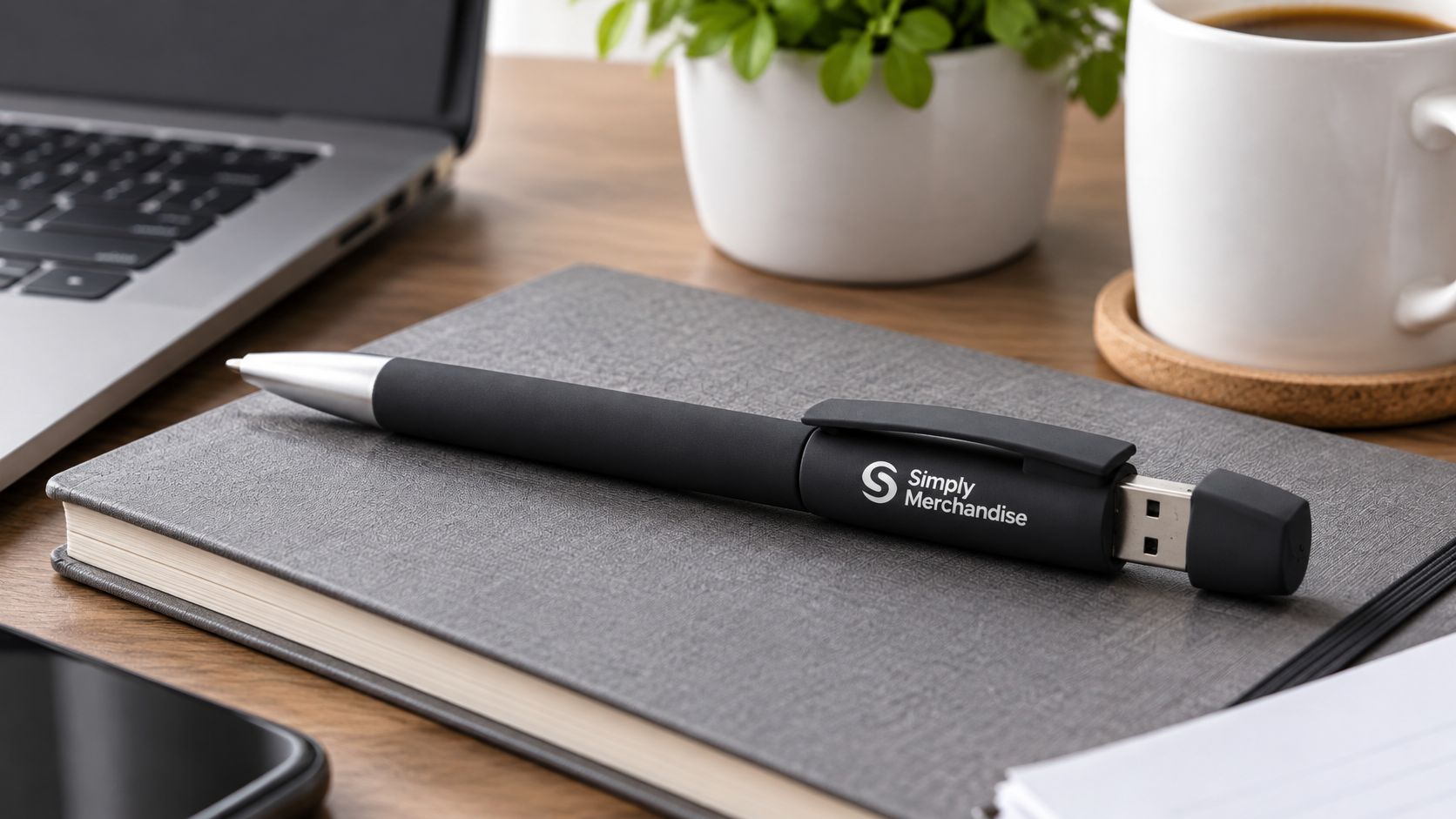
Match the body to where the drive will live: a desk, a lanyard or a sample bag. That answer tells you whether you need a clip, a cap or a flat card. If you're still weighing a drive against other giveaways, the guide to steps to choose the right promotional products sets out the comparison criteria. For follow-up after the event, a QR-based points loyalty program is one way to keep a scanned code earning attention long after the drive has gone into a bag.
Branding Methods That Stay Sharp
Your logo has to survive a pocket, a desk, a car console and three years of handling. A print that looked crisp on a mockup at 100 per cent zoom can wear at the edges inside a month of daily use. The method should follow the lifespan you're promising, not the other way round.
Full-colour digital print handles photographic logos and gradients, and it's the right answer for a one-day event where the drive never leaves a tote bag. On a body that lives in a pocket, the print can rub off under heavy handling. Screen print gives a bold single-colour mark with strong opacity that reads at arm's length on a crowded stand. Laser engraving cuts a permanent mark into the surface and stays legible on dark or painted bodies. Debossing presses a tactile logo you can feel in low light, which matters for pens handed out at evening functions. Sublimation wraps a coated surface fully for a continuous look with no edge.
| Method | Durability | Best situation |
|---|---|---|
| Full-colour digital print | Can rub off under heavy handling | One-day event with photographic logo |
| Screen print | Bold, strong opacity in a single colour | High-volume, one-colour event giveaway |
| Laser engraving | Permanent and legible on dark or painted bodies | Three-year onboarding kit |
| Debossing | Permanent tactile mark that reads well in low light | Three-year onboarding kit |
| Sublimation | Covers coated surfaces fully for a wraparound look | Coated metal or plastic body with a full-wrap design |
Three checks before you approve artwork
Keep it to two colours where you can. Simpler artwork reproduces reliably across methods, and a clean two-colour mark that matches your brand guide beats a six-colour approximation of it.
Leave a clear zone around the plug cap. Logos placed where a thumb sits, or where the cap covers them, vanish the moment the drive goes into a port.
Test contrast on the body colour. A dark logo on a dark rubberised body disappears in photographs and in dim rooms. Ask for a mockup on the actual material before signing off.
A one-day event can take digital print. A three-year onboarding kit should be engraved or debossed.
On file setup, the artwork submission tips for beginners covers the formats and bleed settings that prevent a reprint.
Security Rules Before a Drive Leaves Your Stand
The assumption worth challenging is that a promotional drive is harmless because it's yours. A drive that leaves your stand can be plugged into dozens of unmanaged computers in a week, handed to a colleague, left in a hotel room and found by someone you'll never meet.
The Queensland Office of the Information Commissioner identifies loss, theft, malware infection, unauthorised access, insecure deletion and third-party access as material risks for portable storage devices. Its recommended controls include an approved-device register, rules for personal devices, restrictions based on data sensitivity, secure-erasure procedures and encryption whenever personal information is stored on a portable device. Capacity never appears in that list.
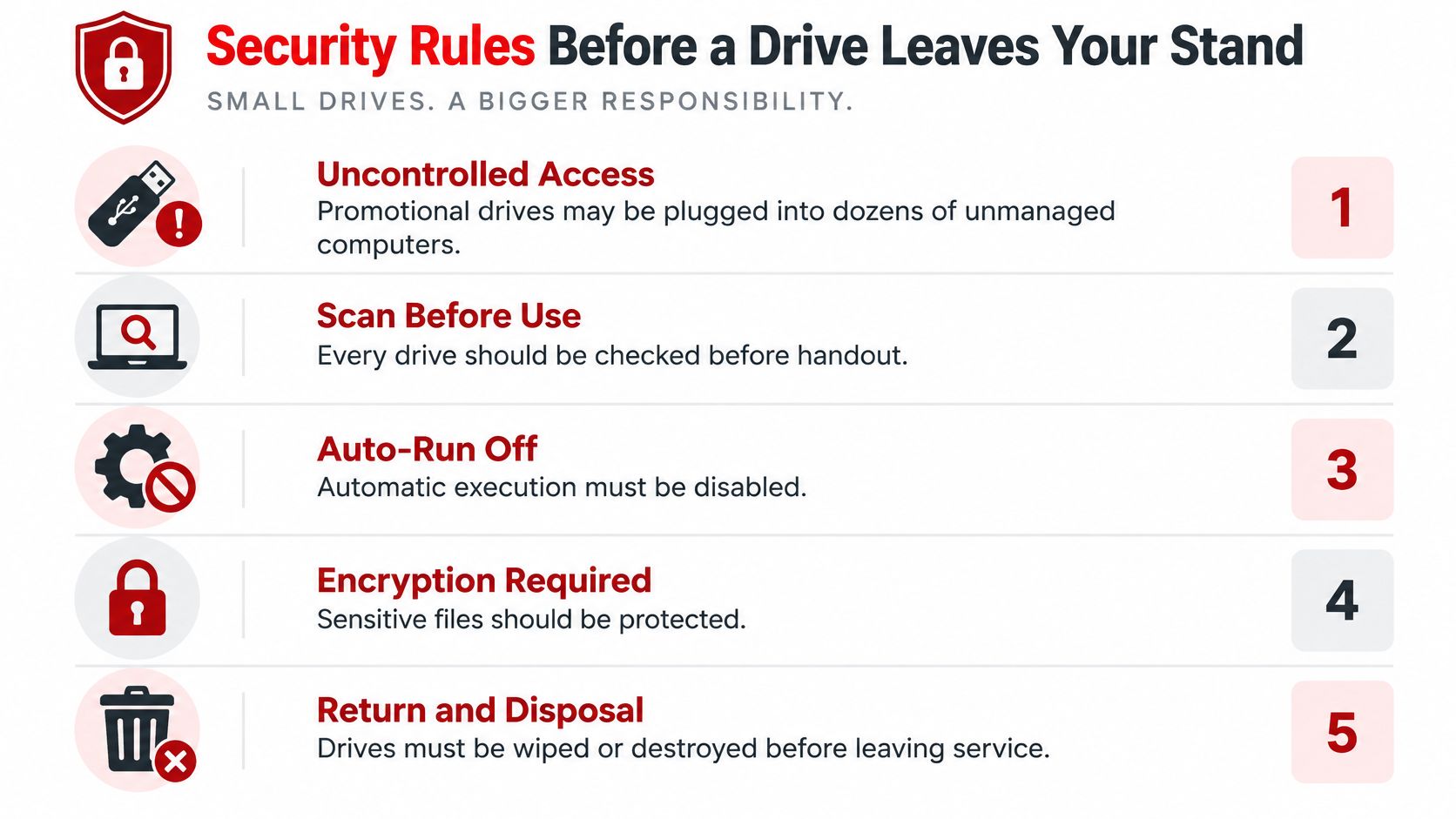
Five controls before the carton leaves the office
- Confirm every file is public before loading it. Not "probably fine", not "it was on the website once". Public.
- Scan the preload for malware. Run the file set through your security tooling as a batch, then again from the master copy you keep for reprints.
- Ship blank media or non-sensitive marketing files only. Drives shouldn't carry customer, employee or government information unless the recipient's IT policy explicitly permits the device.
- Specify encryption where confidential material is involved. That means hardware encryption or an encrypted container, plus a written note on whether write protection is required. Australian Government guidance treats ordinary removable media as unsuitable for classified information and distinguishes approved encrypted USB media from consumer-grade devices.
- Print a short instruction for the recipient. Don't store confidential information on this drive, and erase it before disposal. One line on the sleeve does more than a page on your website.
Australian cyber security guidance recommends avoiding removable media for file transfer where a secure cloud service is available, and encrypting with a strong password when a USB device is necessary, as set out in the Australian Cyber Security Centre guidance. A useful campaign specification follows from that: USB 3.x where supported, reputable flash memory, encryption for sensitive use, malware-screened preload, and a written warning on the sleeve.
Would you be comfortable if this drive were found on a café table? If the answer needs a caveat, the preload isn't ready.
Keeping Drives Responsible From Handout to Disposal
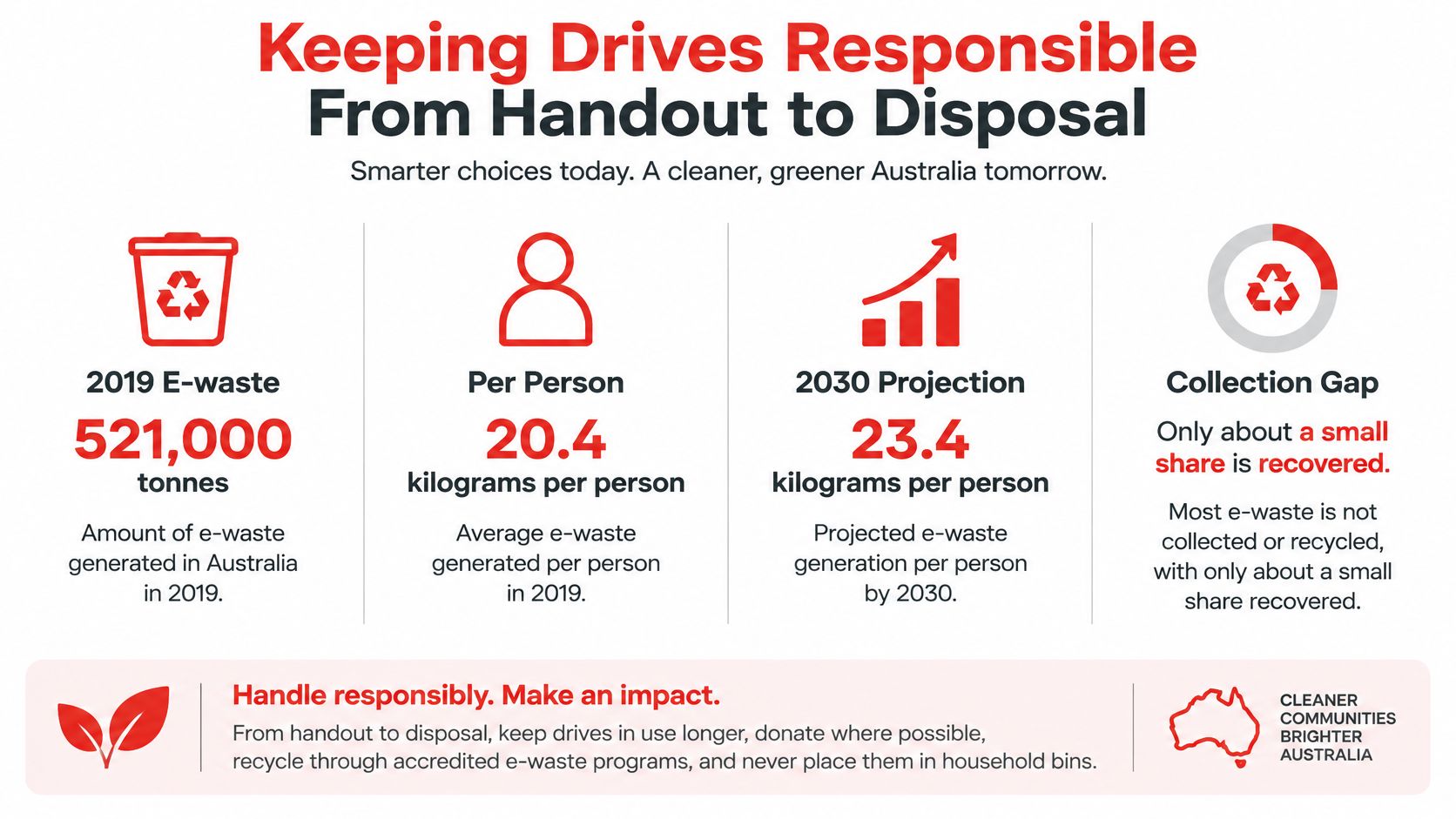
In 2019, Australians generated approximately 521,000 tonnes of e-waste, equivalent to 20.4 kilograms per person, according to the Australian Government e-stewardship evidence report. The same assessment projects generation reaching 23.4 kilograms per person by 2030, and reports that only about 54 per cent of e-waste is currently collected, with roughly 80 per cent of collected material going to low-efficiency recycling.
A run of 2,000 drives is a rounding error against those totals. It's still 2,000 small devices that become a drawer problem, then a bin problem.
A drive is a carrier, not an archive
Australian archival guidance from the National Archives of Australia classifies USB flash drives as unsuitable for long-term storage because they face physical loss, corruption and technological obsolescence, and end-of-life handling has a national reference point in AS 5377:2022, which Victoria's environmental regulator identifies as the standard covering collection, transport and treatment of electrical and electronic equipment for reuse or recycling.
The planning consequence is straightforward. Whatever you preload is a copy. Preload replaceable assets such as brochures, catalogues, event schedules, QR-linked resources or software installers, and point people to the live page for anything that changes: fees, dates, specs, privacy notices. When a batch goes stale, you replace a link, not a print run.
The lifecycle in four steps
- Label every drive with a campaign or asset identifier. A small code on the body tells you which batch a returned or found device belongs to.
- Keep a register for any controlled program. The Australian Signals Directorate recommends organisations maintain removable-media policies covering registration and labelling, handling, lost-device reporting, and sanitisation or destruction at end of life, as set out in its small business cyber security handbook.
- Define the return, wipe or destruction process before the first handout. Who receives a returned drive, who wipes it, where the record of that wipe lives. If nobody owns that step, it doesn't happen.
- Offer a take-back or recycling pathway where feasible. A collection box at the event, a prepaid return envelope for staff drives, or a partner who handles e-waste under the national standard.
Reuse is the trade-off worth naming. Refreshing a batch of drives for a second campaign saves repeat purchasing and keeps devices in circulation longer, but it raises the stakes on verified wiping and clear ownership rules. Secure deletion means overwriting the storage or destroying it, not dragging files to the bin. If you can't prove the wipe, don't reuse the drive for anything a recipient might find.
Three campaigns that get it right
A university open day preloads course guides and campus maps, with a label pointing to the live course page so fees and intake dates never go stale on the drive. The lesson: preload what doesn't change.
A community nonprofit's summer program carries a welcome pack and a QR code, and staff wipe returned drives at the closing event. The lesson: put the return step on the event run sheet, not in a policy PDF.
A trade show hands out blank 16GB drives in a branded sleeve and runs all follow-up by email. The lesson: a blank drive is a legitimate campaign, and often the safest one.
A smaller, controlled drive beats a cheap, unencrypted one every time, and the gap widens the moment a recipient plugs it into a work laptop.
If sustainability is the brief, the eco products range pairs well with drives, since the durable, reusable items around a device often outlast it.
Brief Your Supplier Before You Order
A one-page brief gets an accurate quote instead of a guess. Write it once and reuse it every time you order drives.
- Quantity and date. How many, and the day they need to be in hand, which isn't the day of the show.
- Capacity. The smallest size that holds your public material plus about 20 per cent headroom, with the reasoning noted so nobody upsizes it in a reply-all.
- Preload list. Every file, plus written confirmation that each one is public-only.
- Sensitivity statement. "No personal, HR, payroll or customer data will be loaded", stated on the purchase order. It protects you and it protects the supplier.
- Branding method and durability need. Digital print for a one-day event, engraving or debossing for a three-year onboarding kit.
- Disposal wording. The line printed for recipients: don't store confidential information, and erase the drive before disposal.
Ask whether set-up and mockups are included, and what bulk pricing applies at your quantity. We offer free set-up, free mockups, a Lowest Price Guarantee and bulk discounts, and you can email save@simplymerchandise.com.au for a product and branding quote. Samples are generally unbranded or may carry other companies' logos, with branded samples available at cost, so check the finish before committing to a full run. On comparing bids generally, the Planstone guide to comparing vendor bids sets out how to weigh like against like.
The next action is short: send the brief, approve the sample, place the full order. A request for quote gets the process moving with the capacity, body, print method and preload rules already settled.
Merchandise supplies custom USB drives and thousands of other branded items to businesses across Australia, with free set-up, free mockups, bulk discounts and Australia-wide delivery. Send the brief on this page to save@simplymerchandise.com.au and we'll come back with the capacity, body and branding method that suit your campaign rather than the biggest number on the shelf. Visit Simply Merchandise to start your order and get a sample in your hand before the show.

